

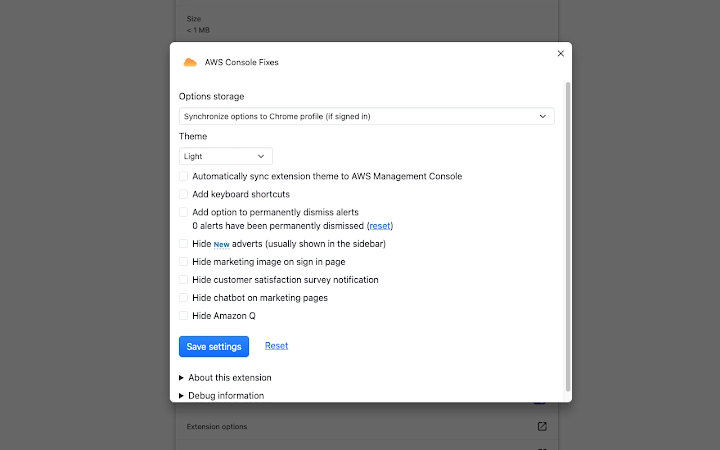
Description
Enhanced AWS Console Experience
Overview
The AWS Console Fixes extension is a developer-focused tool designed to improve the usability and efficiency of the AWS Management Console within web browsers. Developed by stefansundin, this extension addresses common pain points experienced by AWS users during day-to-day cloud operations. It is particularly useful for cloud engineers, DevOps professionals, and developers who interact frequently with AWS services such as EC2, CloudFormation, Lambda, and Route53.
The tool enhances the console’s native interface through targeted CSS adjustments and functional improvements. For example, it increases the size of user data dialogs and improves readability in system logs. These changes aim to reduce visual strain and improve workflow clarity. Additionally, it introduces navigation aids by automatically linking related AWS resources—such as EC2 tags, Auto Scaling Groups, and subnets—directly within the console, enabling faster context switching.
Real-world usage includes streamlining cloud infrastructure management, reducing manual navigation between services, and simplifying repetitive tasks like copying AWS CLI commands from CloudFormation forms. The extension also removes distracting upsells for Aurora, a feature that may disrupt workflow continuity. By focusing on usability rather than new functionality, it serves as a practical companion for professionals managing complex AWS environments.
Key Features & Capabilities
- CSS Enhancements – Applies visual fixes such as larger user data dialogs and improved system log formatting, improving readability and user comfort during extended sessions.
- Resource Linking – Automatically detects and links AWS resource identifiers (e.g., EC2 tags, ASG launch configurations, ELBs, subnets), allowing quick navigation between related services.
- Dropdown Sorting – Sorts Lambda function and Elasticsearch dropdowns in the CloudWatch console for easier selection and faster access to specific resources.
- CLI Command Integration – Adds a textarea in CloudFormation stack creation/update forms to paste and execute AWS CLI commands directly, bridging the gap between console and command-line workflows.
- Input Validation Feedback – Highlights invalid characters in Route53 subdomain fields (non-[a-z0-9._-*]) while still allowing submission, providing clear feedback without blocking legitimate use cases.
- Sign-In Flow Optimization – Adds a redirect link to the sign-in form when a redirect_uri is present, and offers an option to auto-redirect to a consistent domain, improving password manager compatibility.
- Whitepaper Download Button – Adds a direct download button to whitepaper forms, eliminating the need to fill out lengthy registration forms.
- Video Access Without Registration – Enables viewing of AWS Innovate videos without requiring account registration, saving time and reducing friction.
- Upsell Removal – Removes Aurora promotional banners scattered across the console, minimizing distractions during routine operations.
These features collectively reduce friction in daily AWS management tasks. For instance, a DevOps engineer can now quickly navigate from an EC2 instance to its associated Auto Scaling Group or subnet without leaving the current page. Similarly, the CLI integration allows for seamless validation of CloudFormation changes by copying a command to a terminal, improving consistency and auditability.
User Interface, Workflow & Performance
The extension operates entirely within the browser environment, overlaying enhancements on top of the existing AWS Management Console UI. It does not alter the core console layout but instead applies targeted visual and functional updates through CSS and JavaScript injection.
Navigation remains intuitive, as the extension enhances existing elements rather than introducing new panels or menus. The UI changes are subtle yet impactful—such as improved dialog sizing and clearer visual cues for invalid inputs—ensuring minimal disruption to established workflows.
Performance impact is expected to be negligible, as the extension is lightweight (1.2 MB) and runs only on AWS console pages. The developer did not specify resource usage details, but based on its size and functionality, it is likely to consume minimal CPU and RAM during operation. Stability is maintained through modular updates and active community feedback, with the developer encouraging users to report broken features.
Since the extension runs in-browser, it does not require installation beyond standard browser extension procedures. Users can expect consistent behavior across sessions, with no noticeable lag or crashes reported in public usage.
Compatibility & System Requirements
The AWS Console Fixes extension is compatible with Windows and Mac operating systems, supporting modern web browsers used to access the AWS Management Console. It is designed to work with the current version of the AWS console interface, which is regularly updated by AWS.
The installation size is 1.2 MB, indicating a lightweight footprint. The developer did not specify exact system requirements, including minimum CPU, RAM, or browser versions. However, compatibility with major browsers such as Chrome, Firefox, and Edge is implied due to the extension’s reliance on standard web technologies.
Platform compatibility information is limited to the operating systems listed. No details were provided regarding support for Linux or other platforms. Users should ensure their browser is up to date to maintain full functionality, as the extension depends on current web standards.
Pros and Cons
Pros
- Lightweight and fast, with minimal impact on browser performance.
- Improves usability of the AWS console with practical, real-world fixes.
- Enables seamless CLI integration for CloudFormation workflows.
- Removes distracting upsells, improving focus during cloud management.
- Supports offline access to AWS Innovate videos without registration.
- Offers useful navigation shortcuts between AWS resources.
- Free to use with no licensing restrictions.
Cons
- Does not provide new AWS functionality—only enhances existing tools.
- Compatibility may break if AWS updates the console UI unexpectedly.
- Requires manual installation and management through browser extension stores.
- Exact system requirements were not listed.
- Support is community-driven; no official customer service channel.
FAQ Section
Is the extension safe to use with my AWS account?
The extension only runs on the AWS Management Console and does not access or transmit sensitive data. It requests minimal permissions, which are updated as needed. All changes occur locally in the browser.
Does this extension work on all AWS services?
It is optimized for core AWS services like EC2, CloudFormation, Lambda, Route53, and CloudWatch. Some features may not apply to less commonly used services.
How do I install the extension?
Install it via your browser’s extension store (Chrome Web Store, Firefox Add-ons, etc.) using the official listing. Ensure your browser is updated for compatibility.
Can I use this extension offline?
Yes, once installed, the extension functions without an internet connection. However, it requires an active AWS console session to apply its fixes.
Are updates automatic?
Updates are released as needed when the AWS console changes. Users are encouraged to keep the extension updated to maintain compatibility and functionality.
Final Thoughts + CTA
The AWS Console Fixes extension delivers a focused, practical enhancement to the AWS Management Console experience. While it does not introduce new features, it significantly improves usability through thoughtful refinements that reduce friction in daily workflows. Its lightweight design, free access, and developer-driven approach make it a valuable tool for AWS professionals.
It is particularly beneficial for cloud engineers, DevOps teams, and developers who spend significant time managing infrastructure via the AWS console. The ability to link resources, integrate with CLI workflows, and bypass registration barriers adds tangible value to productivity.
For anyone working with AWS on a regular basis, this extension offers a meaningful upgrade without complexity. It’s a subtle but powerful tool that respects the user’s workflow while making it smoother and more efficient.
Download AWS Console Fixes now
Guides & Tutorials for AWS Console Fixes Extension for Chrome
How to install AWS Console Fixes Extension for Chrome
- Click the Preview / Download button above.
- Once redirected, accept the terms and click Install.
- Wait for the AWS Console Fixes Extension for Chrome download to finish on your device.
How to use AWS Console Fixes Extension for Chrome
This software is primarily used for its core features described above. Open the app after installation to explore its capabilities.
User Reviews for AWS Console Fixes Extension for Chrome 0
No reviews found





